WordPress Internal Linking: The SEO Lever Most Site Owners Ignore
You've published the content. Some pages rank. Most don't. The pages that aren't ranking often have one thing in common: they're invisible inside your own site. Internal linking is the SEO signal that's both the most underused and the easiest to fix.
By Auralogics Labs · Product Team
You've published good content. The on-page SEO looks correct. Titles are optimized, meta descriptions are written, the keyword is in the heading. But the page doesn't rank. It sits on page four, or page ten, or nowhere at all.
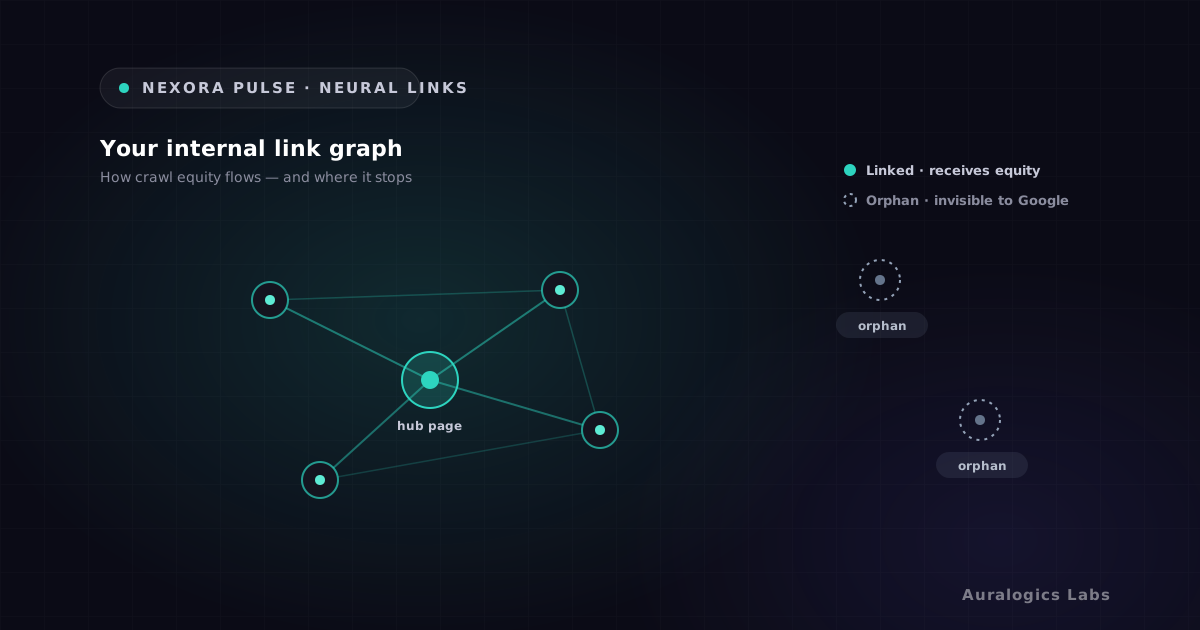
In many cases, the problem isn't the content itself. It's that the page is effectively invisible inside your own website. No other page links to it. Google finds it eventually, but without internal links pointing to it, Google has no strong signal that the page matters. So it doesn't rank as if it matters.
What internal links actually do for your SEO
Internal links serve two distinct functions. First, they help Google discover pages. A URL that no other page links to relies entirely on your sitemap and direct crawl requests to get indexed. A URL that ten relevant pages link to gets crawled more frequently, more consistently, and with more context about what it covers.
Second, internal links distribute PageRank across your site. Every page has some authority based on how many external sites link to it. That authority doesn't stay isolated on the pages that received the links. It flows through internal links to connected pages. A well-linked article on a high-authority domain benefits from that authority in a way that an orphan page on the same domain never does.
What an orphan page looks like to Google
An orphan page is any page with zero internal links pointing to it. It might be perfectly written, fully optimized, and genuinely useful. But without internal links, Google treats it like a page at the edge of your site with no relationship to your main content. It ranks accordingly.
How Google reads your link structure
When Googlebot crawls your site, it follows links. It starts from pages it already knows, finds new links in the HTML, follows them, and maps the connections between pages. The more paths that lead to a page, the more often Googlebot visits it, and the stronger the signal that the page is important.
The anchor text of internal links also carries weight. When your category page links to a product article using the anchor text 'Elementor performance optimization', that text gives Google context about what the linked page covers. It's not as powerful as external anchor text, but it adds to the relevance signal Google uses when deciding what query to rank the page for.
The crawl budget dimension
Larger sites have a crawl budget consideration: Google won't crawl every page on every visit. Pages with strong internal link profiles get crawled more frequently. Pages that are difficult to reach through the link graph get crawled less often or skipped. If you publish a new article that matters for SEO and no existing page links to it, the time between publishing and indexing stretches out.
The three most common internal linking mistakes on WordPress
Most WordPress sites have internal linking problems that are straightforward to diagnose once you can see the link graph. These are the patterns that come up consistently:
- Orphan pages: content that was published and never linked to from any other page. Common with older posts, landing pages created for specific campaigns, and service pages added without updating the navigation or related content.
- Siloed content: related articles that don't link to each other. A site might have five posts about WordPress performance that would each benefit from linking to the others, but they were written by different people at different times and no one connected them.
- Broken internal links: links that point to pages that no longer exist, were moved, or were deleted. Every broken internal link wastes crawl budget and drops a user into a 404 experience. WordPress doesn't track these when you change a URL.
The fourth mistake is more subtle: over-relying on navigation. If your pillar pages are linked from your header and sidebar navigation, they get crawled well. But the deeper content, the articles and specific guides that do most of the long-tail ranking work, often have no internal links beyond whatever WordPress auto-generates in the Related Posts widget.
How to audit your internal link structure
A proper internal link audit tells you three things: which pages have no links pointing to them, which important pages have too few links, and where links are broken. Without a tool that maps the entire graph, you're guessing.
The manual version of this involves crawling your site with a desktop tool, exporting link data into a spreadsheet, and manually identifying orphans and gaps. It works, but it's slow, it goes stale quickly, and it gives you no context about which orphans actually matter for SEO.
What a link audit reveals
Sites that have never run an internal link audit typically find that 20-40% of their published pages have zero internal links pointing to them. These are pages that Google knows exist but treats as low-priority, regardless of content quality.
Auditing and fixing links with Nexora Pulse Neural Links
Neural Links is Nexora Pulse's internal link mapping module. It crawls your entire WordPress site and builds a live map of every internal link: which pages link to which, what anchor text they use, and which pages have no inbound links at all.
The orphan pages view is the most immediately useful output. It shows you a sorted list of all pages with zero internal links, alongside their current SEO score and traffic data if you have Search Console connected. You can see at a glance which orphans matter and which are intentionally thin.
- Full internal link graph: every page, every link, every anchor text
- Orphan page detection: all pages with zero inbound internal links
- Broken link finder: internal 404s with the pages that contain them
- Link opportunity suggestions: related content that could benefit from cross-linking
- Anchor text analysis: where anchor text is too generic or missing entirely
- Updates automatically as you publish and edit
Building a linking strategy that holds over time
The goal isn't just to fix the current orphans. It's to create a habit where new content gets linked from relevant existing pages as part of the publishing workflow. On WordPress, this means maintaining a mental model of your site's content map, or using a tool that maintains it for you.
A useful frame: every page you publish should receive at least two internal links from existing relevant content, and should link out to at least two related pages. That simple rule, applied consistently, produces a site where every page is reachable through the link graph and Google has clear signals about which pages are related.
Internal linking isn't the flashiest part of WordPress SEO. It doesn't get the coverage that keyword research or backlink building do. But it's the part that determines whether the content you've already invested in actually gets found, by Google and by the readers who would benefit from it. Nexora Pulse Neural Links gives you the map to fix it. Install it free and run your first link audit today.
Ready to see these concepts on your stack? Explore Nexora Engine or read the getting-started guide.